FINE TEXTURES AND PHOTOGRAPHIC OVERLAYS TO ENHANCE YOUR PHOTOGRAPHY AND MORE


Showing posts with label Texture pack. Show all posts

Tuesday, May 25, 2010

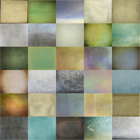
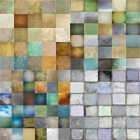
New Fly Edges Texture Pack!

Click for a bigger view
( Go HERE for more Fly Edge detail images )

Ever needed the original Alice in Wonderland photographic look?
Did you yearn for a natural large plate format photographic feel?
Have you ever wanted natural un-contrived edges that are not the everyday humdrum TTV retro, but something a little bit special?
Then this is the product for you!:-)

At long last, we launch our new one-off, cool toned, metallised glass texture pack! Its made with all those people in mind who over the past months have requested edges from us. However this isn't any old edges pack! This is a connoisseurs edges pack that includes all over iridescent grunge goodness!

These edges derive from 100 year + antique French glass silvered plates, lovingly scanned in TIF, then cleaned and processed in a secret way we have developed ourselves, to show only grunge, without the original image. These were produced to be as widely used as possible, both in their original format, or cut and pulled square.

As with all our products we have a minimum sized side of 4000 pixels by 5000. The length being around 30% wider than our previous textures @ 13" x 17" approx inches in 300 dpi for perfect printing and happily usable with your landscape formats. All our textures can be used in  any editing programme that supports the use of  layers,  Photoshop, Photoshop Elements,  Gimp etc

These edges can be used in conjunction with our Normal flypapers or on their own. We're really looking forward to framing our new look with you over the next few months!

Happy Edging! :-)

Paul and Jill

Fly Edges Pack
Only $40

Add to Cart

Please note that this is big, almost 400 mb file so the download may take a while. Average reported download time for this pack varies from 15 to 20 mins.

Monday, March 29, 2010

Flypaper Tex Box Two !

Winter season
Following on the success of Tex Box One we're back with a new pack!
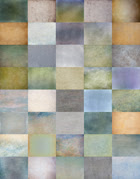
It contains 30 large, professional quality, high resolution textures ranging from the subtle to the grunge.
Over the past several weeks we've had the pleasure of your feedback and have tailored this new pack to our clients needs.
They are smoother, lighter and have more vignettes. There are also clouds (for Bob!) and interesting antique wall textures.
The colours are clearer, following on from the huge hit of 'Apple Blush', we've added several more textural fruit goodies!
This winter collection is also going to be easier to use with darker/lighter images.
The original Tex Box One is still going to be an essential base, we hope you'll have both ready as we'll continue to show use with both!

Still only US $35 for a download.
All our textures can be used in  any editing programme that supports the use of  layers,  Photoshop, Photoshop Elements,  Gimp etc 

For downloads click the Add to Cart button, a download code will be sent to you on payment. 
Buy Tex Box Two
Add to Cart
(Please note the file is over 200mb in size so the download may take a while)
Those on very slow connections may prefer to purchase the textures on CD, please get in touch for details.
Flypaper Combo Offer 
Buy Tex Box One and Two 
For only $65
Add to Cart

The 30 Textures included in Pack Two are:
Algae, Antiquity Scroll, Archival Canvas, Backdrop, Basalt, Beowulf, Burnished Clay, Chlorophyll, Colosseum Sienna, Concorde, Cyprus haze, Gooseberry, Holmes, Icarus Haze, Labyrinth, Lavender Skies, Leaden Hall, Lime Plaster, Lost Void, Luminescent, Marie Antoinette, Ming, Muscatel, Ordinance Map, Paua Nacra, Peach Blush, Rainbow Trout, Sail Cloth, Sunflower Sky and Voyageur Map

Friday, January 29, 2010

Flypaper TEX BOX 1


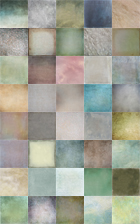
A pack of 25 large, high resolution, unique textures for only$35 USD for download or $45 USD for CD (post included). These textures are professional quality and suitable for commercial as well as personal use.
All our textures can be used in  any editing programme that supports the use of  layers,  Photoshop, Photoshop Elements,  Gimp etc 

For downloads please click on the Add to Cart icon. A download link will be sent to you after you've made your payment.
Buy Tex Box One
Add to Cart

(please note: the file is around 200mb and depending on your connection speed, the download can take anything from 5 minutes to a couple of  hours.


Flypapers Combo Offer 
Buy Tex Box One and Two 
For only $65
Add to Cart

Those on very slow connections may prefer to purchase the pack on CD, please get in touch for details.

Here is a list of the 25 textures included;
White shagreen, Dangerous Liaisons, Caramel Soft,
Aqua Sparkles, Apple blush, Uranium paper
Tarte Tatin, Shagreen Bone, Raw Linen
Pompeii stucco, Phosphorescence, Orient Express
Nostradamus, Nora Batty, Necropolis
Leaky Garret, lamp white, Herculaneum Pumice
Grosgrain, Grande Tour, Elysium
Dove Grey, Bruised Saffron, Apple Crumble
Antique Liaisons.

License agreement

Thursday, November 19, 2009

The Happy Couple - Flypaper Textured :-)


About a month ago I visited a local beach with my son, intending to take photos of him but when we looked over the sand dunes we were surprised to see this pair of NZ Sea Lions a short distance away. Naturally I rushed back to the car to exchange my short lens for a longer version as these guys don't like you getting too close, they are surprisingly fast movers too and you had to keep an eye on them especially if you got between them and the sea.
This is but one of the many photos I took that afternoon and was processed with Flypaper Textures to add a bit of depth and a vignette

The Flypaper Texture I used was Caramel Soft, as well as adding texture it gives a slight vignette effect. I used it at Soft Light 100% This layer was blurred an desaturated.
As well as the texture I used a vintage film effect (a combination of curves, colour layers etc) to mute the colours.
Once I was happy with the effect I used the stamp visible command on a PC it's Ctrl -Alt -Shift -E duplicated that layer and changed it to a Smart object from the drop down filter menu, this wonderful feature which was introduced in PS CS3 lets you go back and edit your filter settings.
Then I used Render lighting from the Filter menu to add more of a vignette. From the render lighting dialogue I selected a 2'oclock spotlight and omni and then tweaked the settings, this can take a while as there are lots of controls to play with, as well as intensity you can also change the colour of the light and the size etc.
See the following screenshot for more details.


I reduced the opacitiy of the lighting layer to about 50% After a final curves layer to adjust the contrast I called it done!