FINE TEXTURES AND PHOTOGRAPHIC OVERLAYS TO ENHANCE YOUR PHOTOGRAPHY AND MORE


Showing posts with label Fly Edges. Show all posts

Saturday, May 14, 2011

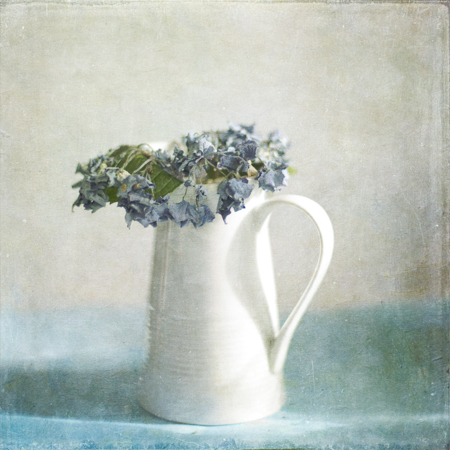
Grunge Hydrangea


I reprocessed this image for Mary's article over at the Digital Photography School,  to help illustrate how using different textures on the same image can  completely change the feel of a photo, it's one of the things textures are so useful for. The earlier version is much more soft, dreamy and subtle.
Anyway, here's what I did.....

Catacomb Frieze @ Overlay 100% masked from the jug
Lyme Fossil @ Overlay 100% masked carefully from the focus areas as desired
It looked okay like this but to give it more of a grunge feel I added a Fly Edge
Fly Edge 13 @ Overlay 100% this layer was inverted using the invert adjustment layer and masked from the central portion so the grunge didn't overwhelm the subject.
Catacomb Frieze and Lyme Fossil are from the Spring Painterly pack.
See it on Flickr 

Spring Painterly Pack
40 Large Textures (38 square and two huge rectangles) for only
$40
Add to Cart

Summer Painterly Pack
36 large textures for only $40
Add to Cart

Complete Flypaper Package
Tex Box 1, Tex box 2, Fly Edges, Summer Painterly & Spring Painterly
$180
Add to Cart

Flypaper Triple Combo Deal
$100 for Tex Box One and Two and the Fly Edges
Add to Cart

Combo Pack Offer
Only $65 for Tex Box One and  Tex Box Two
Add to Cart

Fly Edges Pack
Only $40
Add to Cart

See all our packs and deals on one Page

Wednesday, March 16, 2011

Blueberry


First of all I thought  I'd tell you about the Photoshop texture blending scripts created by our friends over at Digital Outback Photo,  they're pretty easy to use and great for the photographer in a hurry!

I do have a blueberry bush in my garden but this year for some reason they didn't crop very well,  so I bought these ones for photographic purposes and had to hide them in the fridge so I actually had some left to photograph.

This image went through various incarnations before I came to the finished image you see here, it was the addition of the Basalt texture (from the tex box 2) that made all the difference.
So the processing...
Fly Edge 16 @ Screen 20 % to brighten masked from the focal points of the image.
Ming @ soft light 100% this added much of the bluish tone masked as above.
Basalt @ Subtract 67%(new blending mode in CS5, if you have an earlier version of photoshop you'll have to experiment) The brightness of this texture was brightened using a levels adjustment.
Curves layer to tweak tone.

See it a little larger on Flickr


Summer Painterly Pack
36 large textures for only $40
Add to Cart

Flypaper Triple Combo Deal
$100 for Tex Box One and Two and the Fly Edges
Add to Cart

Combo Pack Offer
Only $65 for Tex Box One and  Tex Box Two
Add to Cart

Fly Edges Pack
Only $40
Add to Cart

Gift Coupons

See all our packs and deals on one Page

Thursday, March 3, 2011

Wilted


A few days ago I took delivery of a Lensbaby composer lens, it's something I have had my eyes on for ages but spurred on by Paul's photos taken using his, I decided to take the plunge. I've loved it so far and it's hardly been off the camera though I'm still coming to grips with finding the sweet spot if the lens is in anything other than centred.
Most of the shots I've taken so far have been landscapes so yesterday I decided to see if I could take some closer ones. The focusing distance is about 12 inches and although you can get a lensbaby macro filter for closer work, I don't have one of those, I do however, have a set of 52 mm close-up filters which screw onto the front of an ordinary lens, so I thought I'd  see how they'd work. Since I lack an adapter to attach the filter on the front of the "baby", I just held it in place in front of the lens and moved the camera in and out till I achieved focus and voila, this here is the result! The processing was relatively simple....

Fly Edges 3@ Soft light 100% removed from the flower using a radial graduated fill
Curves layer to add  a little contrast
Dawn Grunge@ Hard light 83% removed from the flower and  lighter parts of the image
Brushed rose @ Soft Light 100%

See it a little larger on Flickr

Summer Painterly Pack
36 large textures for only $40
Add to Cart

Flypaper Triple Combo Deal
$100 for Tex Box One and Two and the Fly Edges
Add to Cart

Combo Pack Offer
Only $65 for Tex Box One and  Tex Box Two
Add to Cart

Fly Edges Pack
Only $40
Add to Cart

Gift Coupons

See all our packs and deals on one Page

Saturday, February 19, 2011

Cone Flower


These cone flowers or echinacea are such beautiful photographic subjects with their bold spiky centres and pretty colours. This is a white form that grows at  my local Botanic Garden. I do have a plant of my own which I notice is just coming into flower for the first time, it's been slightly overshadowed by some taller growing plants next to it so I think I'll have to move it if I want it to thrive.

I could have easily left this one without textures but I wanted to show a slightly different processing using a Fly Edge.

Brushed Rose @ Soft light 100% Toned slightly orange using a hue saturation adjustment
Fly Edge 16 @ Subtract 59% This layer was inverted. Subtract is one of the new blending modes in CS5, if you don't have it and want the same effect you will  have to experiment, using colour burn without the inverting seems to give a similar effect.

See it slightly larger on Flickr


Summer Painterly Pack
36 large textures for only $40
Add to Cart

Flypaper Triple Combo Deal
$100 for Tex Box One and Two and the Fly Edges
Add to Cart

Combo Pack Offer
Only $65 for Tex Box One and  Tex Box Two
Add to Cart

Fly Edges Pack
Only $40
Add to Cart

Gift Coupons

See all our packs and deals on one Page

Thursday, February 10, 2011

Grunge flowers


Just to show that I don't just do pale soft flowers and also to show how textures (and toning) can change the entire feel of an image.  Our fly edges work well on black and white images especially if you want to portray a gritty "early photography" look.

I started by converting the base image to black and white using a black and white adjustment layer, tweaking the colour sliders to get the tone and contrast I wanted.
Fly edges 18 @ multiply 65% desaturated
Curves layer to tweak tone
Then I merged all, ctrl -alt -shift-e on a PC
Converted the layer to a smart filter so I could go back and edit then used the render lighting effects filter to add a bit of drama and light. I used a bluish light hence the blue/grey toning of the finished work.
For a little added grunge I added
Stygian Tin @ Soft light 100% desaturated

Summer Painterly Pack
36 large textures for only $40
Add to Cart

Flypaper Triple Combo Deal
$100 for Tex Box One and Two and the Fly Edges
Add to Cart

Combo Pack Offer
Only $65 for Tex Box One and  Tex Box Two
Add to Cart

Fly Edges Pack
Only $40
Add to Cart

Gift Coupons

See all our packs and deals on one Page

Thursday, December 23, 2010

Berry Christmas!

Who needs Christmas decorations when you've got natural ones in the form of berries! These are red currants, the birds get most of the ones on the bushes these days but in the past I've made red currant jelly, ice-cream and even wine!

We'd like to take this opportunity to wish everyone a peaceful and safe Christmas and holiday season and to thank you all for your support over the past year.

A fairly simple texture recipe today as I've been too busy with Christmas preparations to do much photography or texture work.
Iridescent Brush @ Overlay 100%
Iridescent Brush @ Hard Light 67% with a little removed from the focus flowers
Backdrop @ Multiply 100%
Fly Edge #18@ Screen 41% inverted -this adds a subtle grunge to the image.
Iridescent Brush is from the painterly pack, Backdrop from Tex Box 2
See it on Flickr

Summer Painterly Pack
36 large textures for only $40
Add to Cart

Flypaper Triple Combo Deal
$100 for Tex Box One and Two and the Fly Edges
Add to Cart

Combo Pack Offer
Only $65 for Tex Box One and  Tex Box Two
Add to Cart

Fly Edges Pack
Only $40
Add to Cart

Gift Coupons

See all our packs and deals on one Page

Saturday, September 25, 2010

National Grid


This was taken when I visited the lovely hot pools resort village of Hanmer Springs NZ, last weekend. Just over the hill from town the countryside becomes much wilder and  very picturesque with largely unspoiled tussock land and snowy mountains -that is  apart from the ever present power pylons which follow the road. They take electricity from the southern hydro lakes to the North Island and are very hard to avoid in a photo, at least without walking for miles. So rather than trying to clone them out, I tend to use them as a focal point.

I had intended doing this one entirely with fly edges but got playing (as I do). So the processing...
Fly Edge 24 @ Hard Light 57%
Zuriel Stone @ Hard light 77 % with a little brushed off the lower grown portion of the photo as it made things too dark.
Copy of the Background @ Overlay 72%
Labyrinth @ Hardlight 72% -this layer pulled things together and added a bit of a vignette
Levels layer to tweak the tone.
Zuriel Stone is from Summer Painterly, Labyrinth from Texbox2

See it a little larger on Flickr
Summer Painterly Pack
36 large textures for only $40
Add to Cart

Flypaper Triple Combo Deal
$100 for Tex Box One and Two and the Fly Edges
Add to Cart

Combo Pack Offer
Only $65 for Tex Box One and  Tex Box Two
Add to Cart

Fly Edges Pack
Only $40
Add to Cart

See all our packs and deals on one Page

Thursday, August 26, 2010

Sunday Stroll


I've got lots of photos like this with distant people walking on the beach, at one stage I'd have wanted an completely deserted beach but now I seek out opportunities like this.  Luckily our beaches down here are often all but deserted, especially at this time of the year.

Now the processing, I think I used a texture from each pack in this one.
Sariel Leather @ soft light 100% blurred
Fly Edges 16 @ Multiply 60%
Voyageur Map @ Soft Light 100%
Algae@ Overlay 100%
Tarte Tatin @ Screen 22% masked from the sky
Ming @ Overlay 100% masked from the beach
And it was done!
See it a little bigger on Flickr

Summer Painterly Pack
36 large textures for only $40
Add to Cart

Flypaper Triple Combo Deal
$100 for Tex Box One and Two and the Fly Edges
Add to Cart

Combo Pack Offer
Only $65 for Tex Box One and  Tex Box Two
Add to Cart

Fly Edges Pack
Only $40
Add to Cart

See all our packs and deals on one Page